Is your router holding back your speed?

Picture this: you’re paying for a fast internet plan, but your Netflix keeps buffering and your video calls keep freezing. If your Wi-Fi feels slower than it should, your router could be the bottleneck. The good news? A few checks can help you work out if it’s time for an upgrade and what to look for to ensure your router pulls its weight.
First things first: check what your router can handle
Not all routers are created equal. The Wi-Fi generation your router supports makes a big difference. Older models can limit your speed, no matter how fast your plan is.
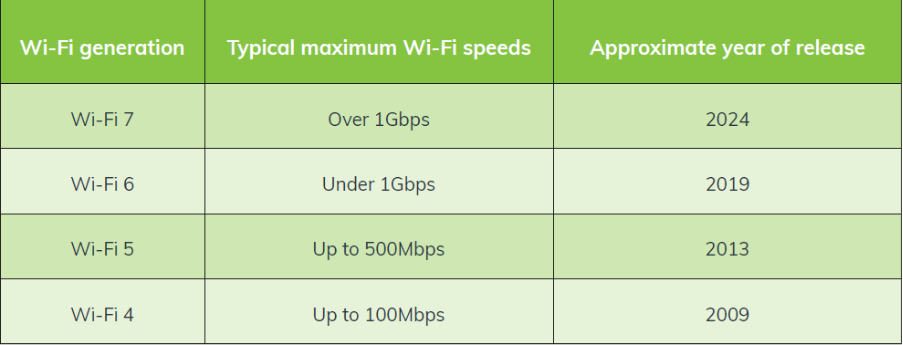
Typically, only the latest Wi-Fi generations can handle higher download speeds.
It’s worth taking a few minutes to check this information by looking up your router’s make and model on the manufacturer’s website. If your router doesn’t support the latest Wi-Fi standards, the maximum speeds you can achieve will be limited, regardless of your internet plan.
It’s like having a sports car but only being able to drive it in second gear. Here’s a helpful table listing the common Wi-Fi generations and their maximum achievable Wi-Fi speeds:
When one router isn’t enough: enter mesh Wi-Fi
Larger home? Multi-story? Thick walls? Mesh Wi-Fi could be your new best friend. Mesh Wi-Fi systems use multiple routers (or “nodes”) working together to deliver seamless, whole-home coverage. No dead zones, and no speed drop off.
The beauty of mesh systems is that as you move around, your device will automatically connect to the strongest signal, providing a smooth and consistent experience.
Don’t forget to check your ports
The back of your router matters too. Here’s what to look for:
WAN vs LAN Ports
- WAN Port (Wide Area Network): This is your router’s “gateway” to the internet.
Your internet connection plugs in to the WAN port either via an Ethernet cable from your modem, or NBN connection box. - LAN Ports (Local Area Network): Faster, and more stable than Wi-FI, these ports connect your router directly to your devices, such as PCs, gaming consoles, or smart TVs.
Different ports = different speeds
Gigabit Ethernet ports support most plans’ full speeds over a wired connection. Refer to the table below for the general minimum requirements based on your plan speed:
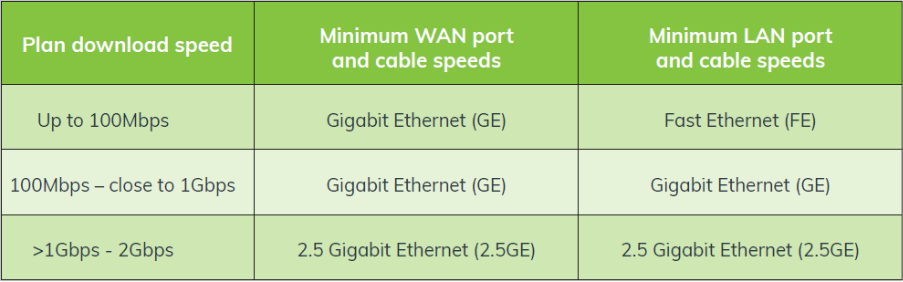
Example: If you’re planning on upgrading to the 2000Mbps plan, you will need a Wi-Fi 7 router with 2.5GE ports to fully support your internet plan’s speed.
Need help picking the right router? We’ve got you
Leaptel can supply a range of routers, including the eero 7 and eero Pro 7, that feature TrueMesh technology, Wi-Fi 7 support, and multi-gigabit ports, so you can get the most out of your home internet plan. If you ever get stuck, simply reach out to our Australian-based support team, and we’ll be more than happy to help you choose the right router for your home internet needs.
The bottom line: Your router plays a crucial role in your internet experience. By understanding what Wi-Fi generation it supports and ensuring it has the right ports for your plan, you can make sure you’re getting the speeds you’re paying for.