
Get the most out of your internet: extra tips for better performance

You’ve got a great router, a solid internet plan, and everything’s properly set up – so here’s how to squeeze even more out of your setup to make your internet experience even smoother.
Check your devices
If your internet plan and router are sorted, but performance isn’t where you’d expect, the issue could be the device you’re using.
Older devices with outdated Wi-Fi standards like Wi-Fi 4 or 5 (or even newer devices with limited hardware) can slow you down. That’s why it’s worth checking your device manufacturer’s specs – that older laptop or smartphone might be the real bottleneck.
Understanding Wi-Fi bands: it’s not one-size-fits-all
Most routers support 2.4GHz and 5GHz frequency bands (or “channels”), while newer tri-band routers may also offer 6GHz support. These are the frequencies your Wi-Fi signal uses, and choosing the right one can make a significant difference in your experience. Here’s how each band performs:
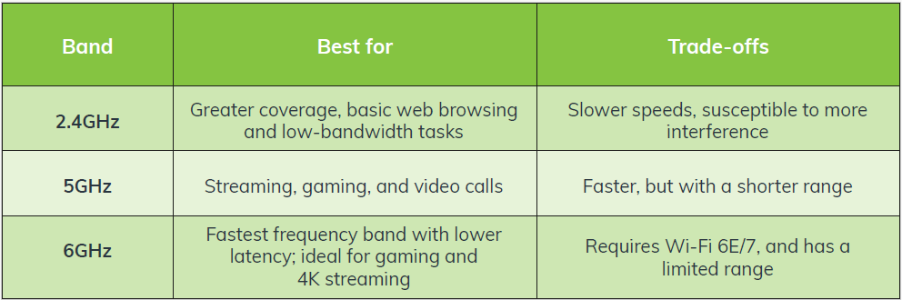
The key takeaway? 5GHz or 6GHz is ideal for high-performance, but only at shorter range. 2.4GHz theoretically has broader coverage but is more prone to interference from other devices like microwaves, baby monitors, and Bluetooth speakers. This interference could actually impact the coverage, so it’s worth testing each frequency band to see what works best for you.
Helpful tip: If your device or router allows it, manually choosing a different band can improve your range or Wi-Fi speed and stability.
Dual-band vs tri-band routers: what’s the difference?
A dual-band router has two frequencies (2.4GHz and 5GHz), while a tri-band router adds an additional 5GHz or 6GHz band. But what does this mean for your everyday internet experience? Tri-band routers handle more devices more efficiently – like adding extra lanes to a busy highway. In mesh systems, the additional band can be reserved for node-to-node traffic, keeping this traffic separate from your devices on a dedicated channel, which helps maintain better overall performance.
Go wired where it counts
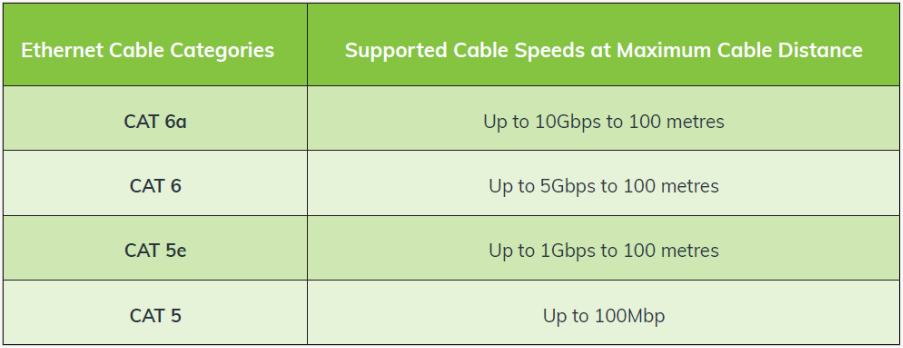
For gaming, video calls, or streaming in 4K, using an Ethernet cable will be faster and more reliable than Wi-Fi. Different types of Ethernet cables exist, but using at least CAT 6 cables will ensure you achieve the full speeds of your internet plan, particularly if you have a multi-gig connection.
Here’s what different cable categories can handle:
Bonus tip for mesh users: Wiring your mesh units together via Ethernet can also significantly improve performance and stability, especially in larger homes.
The bottom line: Getting the most out of your Wi-Fi isn’t just about having a good router; your devices, the frequency bands you use, and your connection type all play important roles. Small tweaks can make a difference!
And remember, if you ever need extra support in achieving lightning-fast speeds, simply reach out to our Australian-based support team, and we’ll be more than happy to help!